Read CSV fields with commas, quotes and line breaks
Import a three-record CSV with Power Query in Excel for Mac, then check commas, escaped quotes and an embedded CRLF.
In this guide
A customer note takes two lines in a text editor, but it should occupy one spreadsheet cell. Another note contains a comma and appears to create an extra column. Before removing characters, establish whether the source file is damaged or the import method is reading it incorrectly. This guide gives you a small known-good file, a verified Power Query load in Excel for Mac, exact expected cell values, and an optional local Python check.
Choose a route that preserves multiline fields
Use the Power Query route below for the tested Mac workflow. On November 10, 2026, loading this file through Power Query in Excel for Mac 16.113.2 preserved all three notes, including both newline characters in Q03. The earlier legacy Text Import Wizard test split that note into another row. These are different import paths; success in one does not certify the other.
The application interface used for this test was Chinese. Menu names below are English equivalents, and the native range image contains only the actual English worksheet content. No English-interface or Windows application test is claimed.
Start with the three-record example
Download quotes-input.csv. It contains a header and three fictional records. Its encoding is UTF-8 with a BOM; the delimiter is a comma and the quoting character is a double quote. The data is deliberately small enough to check by eye:
record_id,note
Q01,"Folder, blue"
Q02,"He said ""ready"""
Q03,"First line
Second line"
The comma in Q01 belongs to the note. The doubled quotes in Q02 store the quotation marks around ready. Q03 contains an actual CRLF line break inside its quoted note; the displayed second line is not a fourth data record. The code block illustrates layout, but the downloadable file is the byte-level reference.
| Record | Expected cell value | What would indicate a failed import? |
|---|---|---|
| Q01 | Folder, blue | Folder and blue land in separate cells |
| Q02 | He said "ready" | Quotes disappear, double up or change the field boundary |
| Q03 | First line, then an embedded CRLF, then Second line | Second line becomes a new worksheet record |
The expected result has two columns and three data records. The file occupies five physical text lines, including the header. Counting lines in an editor will therefore give the wrong record count for this fixture.
Load the example with Power Query in Excel for Mac
- Keep the downloaded CSV unchanged and start with a separate workbook. Use Data → Get Data (Power Query) and choose the Text/CSV source. Select quotes-input.csv.
- In the preview, choose 65001: Unicode (UTF-8) and Comma. The observed data-type detection setting was Based on first 200 rows. The preview had two columns named Column1 and Column2, with four rows: the CSV header followed by Q01, Q02 and Q03.
- Check that Q03 contains both First line and Second line in the same preview field. Click Load and wait for the background query to finish. A correct preview alone is not evidence that worksheet loading has completed.
- Inspect the resulting quotes-input worksheet. In this test, Excel created its own table headers in row 1 and retained record_id/note in row 2. The three actual records therefore occupied rows 3–5. Do not report four business records just because the table contains four rows below its generated headers.
- Select the Q03 note cell, B5 in this observed layout, and enable Home → Wrap Text. Increase its row height if necessary. This reveals the existing line break; it must not be used to disguise a record that was split into another row.
If your import promotes the CSV header automatically, the three notes may instead appear in B2:B4. Identify them by Q01, Q02 and Q03 before applying any cell-specific checks. The evidence below records the direct-load layout without manually promoting or replacing headers.
Compare the actual loaded cells
| Worksheet cell in the recorded load | Observed value | Check |
|---|---|---|
| A1:B1 | Column1 / Column2 | Generated Excel table headers |
| A2:B2 | record_id / note | Original CSV header retained |
| A3:B3 | Q01 / Folder, blue | Comma remains inside one note |
| A4:B4 | Q02 / He said "ready" | Exactly one pair of quotes around ready |
| A5 | Q03 | One record identifier for the multiline note |
| B5 | First line followed by CRLF and Second line | One cell, 23 characters, one CR and one LF |
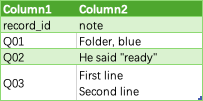
This is a native capture of A1:B5 after enabling wrapping and increasing B5's row height. Values were read from the loaded worksheet before this display adjustment; they were not pasted into cells to manufacture an import result. The worksheet's used range was A1:B5. A surrounding A1:C7 read found no extra populated row or column.
A screenshot alone cannot distinguish CRLF from a single LF. The connected Excel read returned B5 as First line\r\nSecond line, length 23, with one character 13 and one character 10. The comma and quoted phrase also matched the original file exactly. For your own result, compare the formula-bar value and all three records; if a different importer normalizes newline characters, document that separately from preserving the record boundary.
Download the November 10 native Excel test record. It records the source hash, observed settings, loaded cells, character checks and test limits. The existing practice ZIP remains the Python file-test pack; this newer Excel record is a separate download.
Check the source before changing it
Keep the original file. If you only need to diagnose a supplier export, ask for its delimiter, encoding, quoting convention and expected record count. Then use this small fixture to test the receiving application with the same import settings.
A successful import must retain both note lines under Q03 and leave only three data rows. Wrap Text and row height can reveal content already inside a cell; they cannot put a note back together after an importer has split it into two records. Likewise, choosing a comma delimiter will not help if an importer does not honor quoting across line breaks.
If the fixture works but your file fails, compare the source format and the failing record. If the fixture also fails, change the import method before editing the source data. For a file that opens entirely in one column, begin with delimiter selection; for unreadable characters, start with encoding.
Run the optional local structure check
For a reproducible second opinion, download and extract the CSV structure and mapping practice pack. It includes the fixture, readable Python source, expected results and a test runner. The scripts use Python 3.9 or newer and its standard library, with no package installation and no network requests. If Python is not available on your computer, the visual checks above still apply; a colleague with Python can run the same fixture.
Open a terminal in the extracted folder. On macOS or Linux, run:
python3 csv_structure_check.py quotes-input.csvOn Windows, use the Python launcher if it is installed:
py -3 csv_structure_check.py quotes-input.csvThe report prints the header, record count, physical line count and decoded strings. Look for data_records: 3 and physical_lines: 5. In JSON, Q03 appears as First line\r\nSecond line. Those escape sequences make the two stored newline characters visible; they are not extra literal backslashes in the CSV cell.
The helper reads one UTF-8 file, accepts an optional BOM, and fixes the dialect to comma plus double quotes. It checks for duplicate, blank or edge-spaced headers and inconsistent field counts. It stops above 5 MB per input file. It does not edit the input, auto-detect other encodings, repair malformed data or validate business rules. Output includes the decoded values, so keep terminal logs private when checking your own records.
Interpret a failed check
| Symptom | Likely next investigation |
|---|---|
| STOP with a quoting error | Ask the exporter to check an unclosed or incorrectly escaped quoted field |
| Field count differs | Inspect unquoted delimiters, truncated records or blank lines |
| UTF-8 decoding fails | Confirm the actual encoding; do not delete unreadable bytes |
| Header contains spaces or duplicates | Resolve the agreed field names before mapping records |
| Structure passes but the amount is wrong | Check values and units separately; syntax cannot establish business accuracy |
Python's strict CSV reader detects some malformed quoting, but it is not a complete RFC conformance validator. A successful check means this parser read the stated dialect with consistent widths. A different application can still reject or interpret the file differently. In particular, this helper does not sanitize spreadsheet formulas or establish that a supplier file is safe to open.
Avoid repairs that silently change the data
Do not remove every quote or replace every line break with a space. These operations would change valid note values and could turn an embedded comma into a column separator. If the receiving system cannot support multiline fields, agree on a replacement rule with the recipient and produce a separate derived file. Keep the original and document which characters changed.
For a round-trip check, compare decoded field values after export and reimport. Byte-for-byte equality is a stricter requirement: a writer may change BOM usage or line endings while retaining the same table. Our test runner checks the embedded CRLF value explicitly, rather than assuming the worksheet display proves it.
Test history and limits
On October 22, 2026, local tests with Python 3.9.6 on macOS confirmed the three exact records, five physical lines and preserved CRLF. A CSV writer/reader round trip retained the values. The shared practice suite also checked malformed inputs and mapping failures; all 37 assertions passed. Download the dated test record, or run python3 test_csv_practice.py from the extracted pack to reproduce the checks.
The September 30 test with Excel for Mac 16.112.2 used the Text Import Wizard: Q01 and Q02 survived, but Q03 was split into an extra worksheet row. That failed path remains documented. On November 10, the Power Query preview for the original CSV was prepared by the publisher; the assistant then clicked Load in the actual Excel interface and independently read the resulting cells through the connected workbook. Excel for Mac 16.113.2 preserved the three records and exact note strings. The only subsequent workbook change was wrapping/row height for the evidence image.
This new check validates the displayed preview settings and the load into this workbook. It does not verify every upstream source-selection dialog, Windows behavior, export/reimport, later refreshes, large files or every possible CSV dialect. Keep the original file and test your own receiving application with the fixture before adapting the workflow.
Continue and references
Once record boundaries are correct, use header-based combination when exports change column order. Before delivery, follow the CSV export checks.
RFC 4180 describes common quoting conventions; it does not guarantee every exporter uses them. The Python csv documentation documents reader behavior and newline handling used by the downloadable helper.